Searching for Projects
The Organizer dialog provides a number of search options to help you quickly find saved projects on local and remote servers. Projects that match the selected search criteria are added to the Projects list.
Main search tab
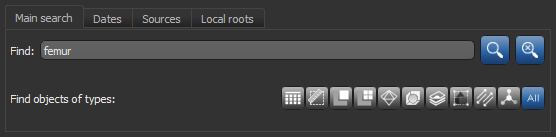
Main search… The Main search tab provides a number of options to search for matching projects. You can search projects for matching tags and text, such as the name of the items in projects, or you can search for types of objects. In addition, you can apply other criteria in the Dates, Sources, and Local roots tabs.
Click the Search button to find projects that match the selected search criteria. You should note that if no search criteria is entered in the Find box and all types of objects are selected, the results will be all saved projects on the selected sources and local roots.
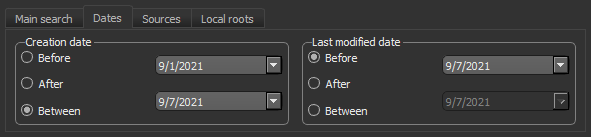
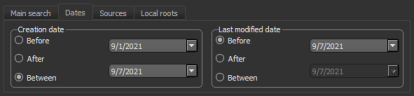
Dates… Items on the Dates tab let you limit searches to projects created before, after, or between specific dates or that were last modified before, after, or between specific dates.
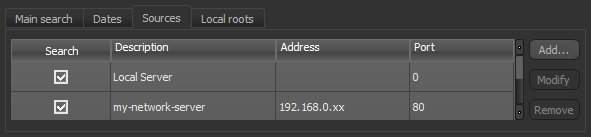
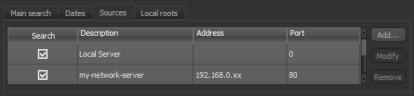
Sources… You can select the local and remote servers to search on the Sources tab.
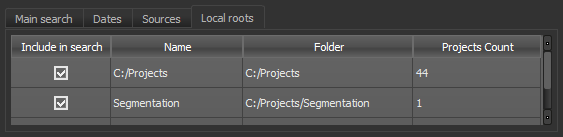
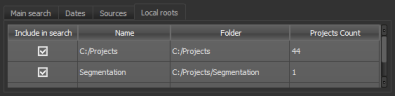
Local roots… Lets extend or limit your search to specific local root folders.
 How to Search for Projects
- Do the following, as required:
- Click the Dates tab if you want to limit your search to projects created before, after, or between specific dates or that were last modified before, after, or between specific dates. These options are available in the Create date and Last modified date boxes, as shown below.
- Check all of the sources that you want to search on the Sources tab, shown below.
Note Refer to the topic Accessing and Adding Remote Servers for information about connecting to network servers
- Check all of the local root folders that you want to search on the Local roots tab, as shown below.
Note Refer to the topic Adding and Editing Root Folders for information about adding and editing root folders.
- Click the Dates tab if you want to limit your search to projects created before, after, or between specific dates or that were last modified before, after, or between specific dates. These options are available in the Create date and Last modified date boxes, as shown below.
- Select the search criteria as follows:
- Enter the text that you are searching for in the Find box. In this case, the Organizer will search for matching projects and matching items in projects, as well as matching project and item tags.
- Select the types of objects that you are searching for by choosing one of more of the Find objects of types items. In this case, the Organizer will search for objects that match the selected type(s) and, if entered, that include matching text.
- Click the Search button.
All projects that match the search criteria are listed in the Projects list.
- Expand a matching project to view the available items.
Note Refer to the topic Loading Data from Projects for information about loading different data types.